


Première utilisation
- Placez la station de charge contre un mur, sur un sol dur et plat. Laissez 0,6 m libre de chaque côté et 1,5 m à l'avant, pas juste à côté d'une porte ou d'un escalier, et avec une bonne couverture wifi.
- Posez le tapis de charge devant la station. Il protège votre sol lorsque le robot revient avec un patin de lavage humide.
- Chargez d'abord complètement le robot. Il est livré partiellement chargé.
- Fixez les patins de lavage sur les supports et remplissez le réservoir d'eau avec de l'eau propre et froide.
- Connectez-le à l'application Smart Life et laissez-le créer une première fois le plan de votre logement.
- Démarrez toujours depuis la station de charge, et laissez la fonction lavage désactivée lors du premier passage.
Utilisation & fonctions
- Marche/arrêt : maintenez le bouton enfoncé. Une pression courte lance le nettoyage.
- Pause : appuyez sur n'importe quel bouton. Le bouton retour le renvoie à la station de charge.
- Dans l'application : cartes pour plusieurs étages, murs virtuels, zones, programmations, cinq niveaux d'aspiration et trois niveaux d'eau.
- Lavage : uniquement de l'eau propre et froide. Pas d'eau de Javel ni de détergent — cela endommage la pompe. Sur les tapis, il soulève automatiquement les supports de lavage.
- Vidage automatique : après chaque passage, la station de charge vide le bac à poussière dans le sac à poussière de 3 litres.
- Si la batterie se vide pendant le travail, il se recharge tout seul puis reprend là où il s'était arrêté.
Après utilisation & entretien
- Retirez l'unité de lavage juste après le lavage, videz le réservoir d'eau et laissez-le sécher.
- Lavez les patins de lavage à la main à l'eau propre et laissez-les sécher complètement.
- Videz le bac à poussière tous les jours. Nettoyez chaque semaine le filtre, la brosse principale, la brosse latérale, les capteurs et la roue avant.
- Remplacez le filtre, les brosses et les patins de lavage tous les 3 à 6 mois.
- Le filtre HEPA n'est pas lavable : tapotez-le seulement délicatement. Pas d'eau, de savon, de brosse ni d'air comprimé.
- Ne pas détartrer. Le vinaigre et les détartrants endommagent le robot — utilisez plutôt de l'eau distillée.
- Laissez-le sur la station de charge lorsque vous ne l'utilisez pas. C'est le mieux pour la batterie.
Problèmes courants
1. Ne s'allume pas
- Batterie vide. Placez-le bien aligné sur le tapis de charge et rechargez-le. Utilisez-le entre 0 et 40 °C.
2. Ne se recharge pas
- La station est-elle branchée sur une prise qui fonctionne et le voyant est-il allumé ? Nettoyez les contacts de charge.
3. Ne trouve pas la station de charge
- Retirez les obstacles ou placez la station dans un endroit plus dégagé, et essuyez le tapis de charge.
4. Pas de wifi
- Réinitialisez le wifi, mettez l'application à jour, redémarrez le routeur, vérifiez le mot de passe.
5. Bruit pendant le nettoyage
- Quelque chose est coincé. Nettoyez la brosse principale, la brosse latérale et les roues.
6. Ne reprend pas après la charge, ou les programmations ne se lancent pas
- Le mode Ne pas déranger est activé. Assurez-vous aussi que la batterie est au-dessus de 20 %.
7. Ne se vide pas tout seul
- Activez le vidage automatique dans l'application et vérifiez le sac à poussière.
8. Ne lave pas à l'eau
- Débit d'eau trop faible, réservoir vide, ou la fonction lavage est désactivée.
Vous ne trouvez pas de solution ? Écrivez-nous à support@achate.com.
Pièces & accessoires
Achaté Robot aspirateur laveur - Brosse latérale
Achaté Robot aspirateur laveur - Patins de lavage
Achaté Robot aspirateur laveur - Brosses d'aspiration
Achaté Robot aspirateur laveur - 5 sacs à poussière
Achaté Robot aspirateur laveur - 2 filtres
Achaté Robot aspirateur laveur - Kit d'entretien
Votre pièce ne figure pas dans la liste ? Contactez alors le service client.
Utilisation en toute sécurité
- Le robot n'a pas de capteurs anti-chute. Placez toujours une barrière physique près des escaliers, des balcons et des dénivelés avant de le laisser rouler.
- Rangez les câbles, cordons, lacets, papiers et tapis légers. Ils s'emmêlent ou sont entraînés.
- Éteignez les bougies et les chauffages d'appoint.
- Testez d'abord un nouveau sol ou tapis sur une petite zone. Après le lavage, un sol peut être glissant.
- Seul le module de lavage peut être mouillé. Ne l'utilisez pas dans ou près d'une baignoire, d'une douche ou d'une piscine.
- Produit laser de classe 1 : ne regardez pas dans le LiDAR rotatif et n'ouvrez pas le boîtier.
- L'ouvrir ou le réparer vous-même annule la garantie. Contactez-nous via support@achate.com.
- Première utilisation
- Utilisation & fonctions
- Après utilisation & entretien
- Problèmes courants
- Pièces & accessoires
- Utilisation en toute sécurité
- Accessoires
Accessoires supplémentaires
Découvrez tous les accessoires du robot aspirateur laveur dans notre boutique en ligne :
-


-


-


-
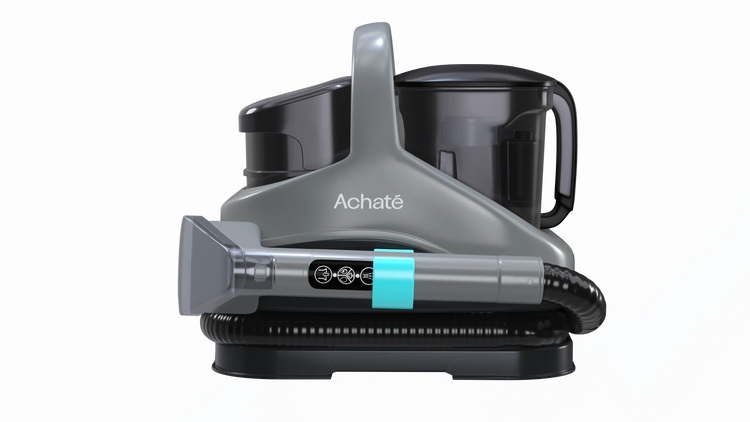
 Achaté Nettoyeur de taches PRO vapeur & eau chaude
179249Économisez 70
 Fonction vapeur
 Aspire & nettoie
-


-

 Achaté Robot aspirateur laveur
299499Économisez 200
 Détection d'objets intelligente
 Connexion à l'application
-


-


-


-


-


-


